

Backups are one of those things people often postpone. Everything usually works fine — until it suddenly does not.
A deleted file, a failed disk, a broken update or a compromised system is enough. At that point, it no longer matters whether you planned to create backups. What matters is whether they actually exist and can be restored.
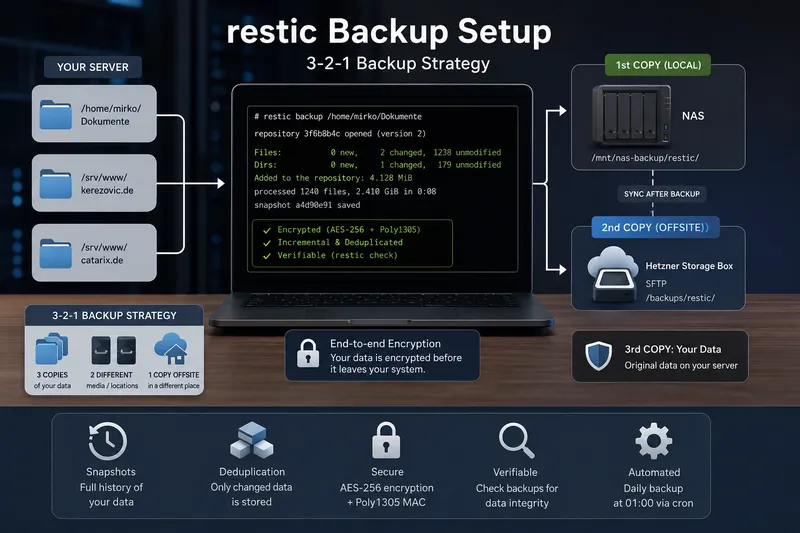
In this guide, we build a practical backup setup using restic. The backups are stored locally on a NAS and additionally copied to a Hetzner Storage Box for offsite protection.
Goal of this guide
At the end, we will have:
- daily automated backups at 01:00
- local backups stored on a NAS
- additional offsite backups on a Hetzner Storage Box
- encrypted restic repositories
- separate passwords for each repository
- a small and easily extendable backup script
In this example, we back up:
/home/mirko/Documents/srv/www/kerezovic.de/srv/www/catarix.de
What is restic?
restic is a modern backup program for Linux, BSD, macOS and Windows. It consists of a single executable and does not require a dedicated backup server.
Backups can be stored locally, via SFTP, on REST servers, S3-compatible storage, cloud providers and many other backends.
Three features make restic especially interesting:
- Encryption: data is encrypted before it is stored.
- Incremental backups: after the first run, only changes are transferred.
- Deduplication: identical data blocks are stored only once.
Why restic instead of rsync or scp?
rsync and scp are powerful tools, but they are not complete backup solutions on their own.
- scp copies files, but has no snapshot history.
- rsync synchronizes efficiently, but older states may disappear without additional logic.
- restic creates encrypted snapshots with history, deduplication and restore capabilities.
This is an important difference: A synchronization may also replicate accidental deletions. Snapshots allow restoring older states of your data.
The 3-2-1 backup strategy
A good backup concept often follows the 3-2-1 rule:
- 3 copies of your data
- 2 different storage locations or media
- 1 copy stored offsite
In our example:
- original data on the server
- backup on the local NAS
- additional offsite backup on the Hetzner Storage Box
This protects not only against deleted files, but also against hardware failure or local disasters.
Encryption in restic
restic encrypts data client-side before it leaves your system. This is especially important when backups are stored on external systems or cloud providers.
According to the restic documentation, repository data is encrypted using AES-256 in Counter Mode and authenticated with Poly1305-AES.
In practice, this means: Without the repository password, the backup data is unreadable.
Important: Losing the password means losing access to the backups.
Using password files instead of environment variables
Many simple examples use environment variables for the repository password. For long-term automation, root-protected password files are usually cleaner and safer.
Advantages:
- no passwords directly inside scripts
- better suited for cronjobs
- access can be controlled using file permissions
- separate passwords for each repository
Installing restic
On Debian or Ubuntu:
sudo apt update
sudo apt install restic
Check the installed version:
restic version

restic 0.16.4 compiled with go1.21.0 on linux/amd64
Preparing the directory structure
sudo mkdir -p /root/.restic
sudo mkdir -p /root/scripts

sudo chmod 700 /root/.restic
sudo chmod 700 /root/scripts
Creating password files
sudo sh -c 'openssl rand -base64 48 > /root/.restic/documents.pw'
sudo sh -c 'openssl rand -base64 48 > /root/.restic/kerezovic.pw'
sudo sh -c 'openssl rand -base64 48 > /root/.restic/catarix.pw'

sudo chmod 600 /root/.restic/*.pw
These password files should also be documented securely in a password manager.
Mounting the NAS
In this example, the NAS is mounted at:
/mnt/nas-backupA simple CIFS example:
sudo mkdir -p /mnt/nas-backup

sudo mount -t cifs //nas/backup /mnt/nas-backup \
  -o credentials=/root/.smbcredentials
Initializing repositories
Documents repository
sudo restic \
  --repo /mnt/nas-backup/restic/documents \
  --password-file /root/.restic/documents.pw \
  init
kerezovic.de repository
sudo restic \
  --repo /mnt/nas-backup/restic/kerezovic \
  --password-file /root/.restic/kerezovic.pw \
  init
catarix.de repository
sudo restic \
  --repo /mnt/nas-backup/restic/catarix \
  --password-file /root/.restic/catarix.pw \
  init
Creating the first backup
sudo restic \
  --repo /mnt/nas-backup/restic/documents \
  --password-file /root/.restic/documents.pw \
  backup /home/mirko/Documents
The first run transfers all files. Future runs only store changes.
This is one of the biggest advantages of restic: Each backup creates a full snapshot view while only storing changed blocks internally.
Preparing the Hetzner Storage Box
The Hetzner Storage Box can be accessed via SFTP. The required credentials are available in the Hetzner Robot interface.
Example:
- User:
u123456 - Server:
u123456.your-storagebox.de - Path:
/backups/restic
Backup script
Now we create a small backup script that first writes backups to the NAS and afterwards to the Storage Box.
sudo vi /root/scripts/restic-backup.sh
The script can easily be extended with additional backup targets.
Testing the script
sudo /root/scripts/restic-backup.sh
Always test backup scripts manually before enabling automation.
Creating the cronjob
sudo crontab -e
Add:
0 1 * * * /root/scripts/restic-backup.sh
This starts the backup every day at 01:00.
Showing snapshots
sudo restic \
  --repo /mnt/nas-backup/restic/documents \
  --password-file /root/.restic/documents.pw \
  snapshots
Verifying backups
Backups should not only exist — they should also be verified regularly.
sudo restic \
  --repo /mnt/nas-backup/restic/documents \
  --password-file /root/.restic/documents.pw \
  check
Testing restores
A backup is only useful if restoring actually works.
sudo mkdir -p /tmp/restore-test

sudo restic \
  --repo /mnt/nas-backup/restic/documents \
  --password-file /root/.restic/documents.pw \
  restore latest \
  --target /tmp/restore-test
Restoring single files
sudo restic \
  --repo /mnt/nas-backup/restic/documents \
  --password-file /root/.restic/documents.pw \
  restore latest \
  --include "/home/mirko/Documents/example.txt" \
  --target /tmp/restore-single
Important notes
- store password files securely
- test restores regularly
- monitor logs
- ensure NAS availability before backups start
- do not skip offsite backups
If ransomware gains access to the backup target, backups themselves may also be damaged or deleted. Protecting backup storage is therefore extremely important.
Need help with topics like these? With Catarix IT, I support businesses and individuals with analysis, optimization and implementation – from systems and networks to customized IT solutions.
Conclusion
restic makes it possible to build a powerful backup solution without complex infrastructure.
Snapshots, encryption, deduplication and verification make it significantly more capable than simple copying with scp or synchronization with rsync.
In this example, backups are written daily to a NAS and additionally copied to a Hetzner Storage Box. This creates a practical and extendable 3-2-1 backup strategy.
The most important part remains: A backup is only a real backup if it runs automatically and restore tests are performed regularly.