
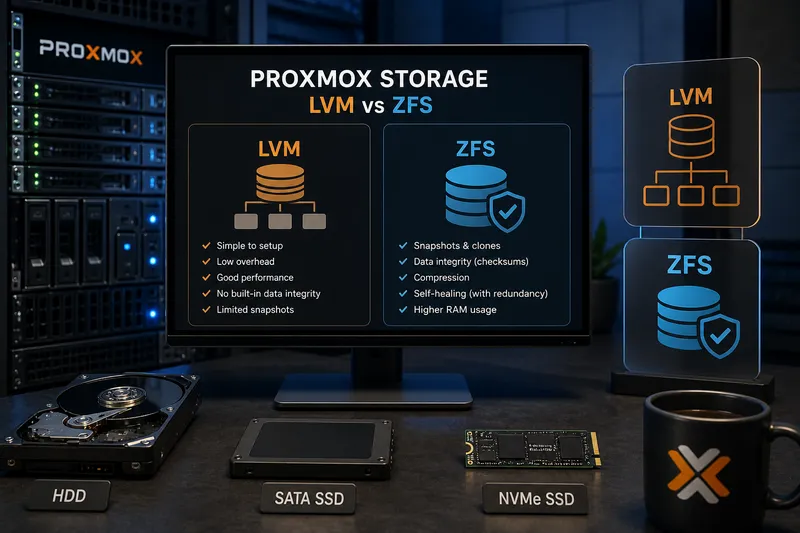
When Proxmox becomes slow, the root cause is often not the CPU or RAM — but the storage.
Especially with multiple virtual machines, the type of storage has a huge impact on overall performance. Still, many people are not fully aware of the differences between LVM, ZFS or different storage technologies.
In this article, we take a practical and easy-to-understand look at the most important storage options in Proxmox — including some additional technical background.
Why storage matters
Virtual machines generate a large number of read and write operations. When several VMs are active at the same time, this can quickly result in thousands of I/O operations per second.
If the storage is too slow or latency becomes too high, the entire system may suddenly feel sluggish. VMs respond slowly, backups take longer and I/O wait increases.
This is also one of the most common reasons why a system suddenly feels slow. If you know this problem, you may also want to read Proxmox slow? Causes & fixes.
HDD, SSD or NVMe?
One of the biggest performance differences often comes from the storage device itself.
- HDD: inexpensive, but slow with many simultaneous operations
- SSD: significantly faster and sufficient for many setups
- NVMe: extremely high IOPS and low latency — ideal for virtualization
Traditional HDDs especially struggle when multiple VMs are active. Virtual machines create many small random access operations — exactly the weak point of mechanical drives.
For modern Proxmox systems, SSDs should be considered the minimum today. For productive environments or databases, NVMe is often worth it.
What is LVM?
LVM stands for Logical Volume Manager. It is not a filesystem itself, but an additional abstraction layer between physical disks and filesystems.
In simplified terms: LVM combines physical disks into so-called volume groups and creates logical volumes on top of them. These logical volumes can then be used like regular partitions.
The major advantage: Storage becomes much more flexible and easier to expand.
Advantages of LVM
- easy to configure
- low overhead
- solid performance
- flexible resizing
Disadvantages of LVM
- no built-in data integrity
- limited SnapshotA snapshot records the state of a filesystem, volume or VM at a specific point in time and makes rollbacks easier.
More in the IT glossary -> capabilities - no self-healing
For smaller environments, lab systems or simple virtualization setups, LVM is often completely sufficient.
What is ZFS?
ZFS is much more than just a filesystem. It combines a volume manager and a filesystem in a single architecture.
This allows ZFS to provide features that traditional setups using LVM plus a separate filesystem cannot easily offer.
One of the most important features is integrated data integrity. Every block receives a checksum. When data is read, ZFS can detect corruption.
In redundant setups, ZFS can even repair corrupted data automatically. This is one of the reasons why ZFS is especially popular in storage systems.
Advantages of ZFS
- snapshots and clones
- data integrity through checksums
- compression support
- self-healing in redundant setups
- high flexibility
Disadvantages of ZFS
- higher RAM usage
- more complexity
- not ideal for very small systems
Why does ZFS require more RAM?
ZFS uses RAM heavily for caching and metadata management. This can significantly improve performance — but also increases memory usage.
Years ago, a common rule of thumb was “1 GB RAM per TB of storage”. That is no longer universally accurate today, but it still illustrates the basic idea: ZFS benefits greatly from additional RAM.
On very small systems or systems with limited memory, this can become problematic.
In such environments, ZRAM on Linux and Proxmox can help reduce memory pressure and improve responsiveness.
Snapshots and clones
One of the biggest advantages of ZFS is its snapshot functionality.
A snapshot stores the state of a filesystem at a specific point in time. This makes it easy to restore older states.
This is especially useful for:
- VM backups
- testing environments
- rollback after updates
- VM cloning
This is extremely practical in virtualization environments.
Local storage vs network storage
Not all storage is directly attached to the Proxmox server. Especially in larger environments, centralized storage systems are often used.
NAS
A NAS (Network Attached Storage) provides storage over the network. Typical protocols include:
- NFS
- SMB/CIFS
NAS systems are commonly used for:
- backups
- ISO storage
- templates
- smaller VM environments
Performance depends heavily on the network. A 1 Gbit/s connection can quickly become a bottleneck.
iSCSIiSCSI is a network protocol that provides block-level storage over TCP/IP and makes remote disks usable like local drives.
More in the IT glossary -> and SANA SAN is a dedicated storage network that provides centralized block storage to servers with high availability and performance.
More in the IT glossary ->
iSCSI operates on the block level and presents remote storage almost as if it were locally attached.
This is commonly used in SAN (Storage Area Network) environments.
Advantages include:
- centralized storage systems
- live migrations
- HA clusterAn HA cluster connects multiple systems so services can continue running on another node if one node fails.
More in the IT glossary ->s - scalable infrastructure
Such solutions are common in professional virtualization environments.
However, they also increase:
- complexity
- costs
- dependency on the network
Common mistakes
- using HDDs for multiple productive VMs
- running ZFS without enough RAM
- treating storage as a secondary concern
- using slow networks for NAS or SAN systems
The last point is often underestimated. Even the best storage system cannot perform well behind a slow network connection.
Quick wins
- switch to SSD or NVMe if possible
- monitor I/O wait
- only use ZFS with sufficient RAM
- avoid running network storage over slow connections
If you replace old SSDs or hard drives, you should securely erase them beforehand. I explain how to do this safely under Linux in the article Securely erase data drives under Linux.
Need help with Proxmox, virtualization or storage-related topics?
With Catarix IT, I support businesses and individuals with analysis, optimization and troubleshooting — from performance issues to stable virtualization and storage solutions.
Conclusion
Storage is one of the most important factors for Proxmox performance and stability.
The choice between LVM, ZFS, local storage or network storage strongly depends on your specific requirements.
Understanding the fundamentals and avoiding common mistakes can prevent many problems before they even occur.
And in many cases, a faster and better planned storage setup improves performance far more than adding additional CPU or RAM.