

There are situations where a network simply feels “strange”. Everything is somehow slow, websites load sluggishly, connections react with delay, but it is hard to explain what is actually going on.
I recently ran into exactly such a case. In the end, the cause was neither the internet connection nor the hardware, but the Wi-Fi itself.
The starting point
The network consisted of 74 devices in total, many of them connected via Wi-Fi: smartphones, tablets, notebooks, TVs and various IoT devices.
In addition, there was a Wi-Fi bridge connecting another segment.
At first glance, everything looked fine:
- internet connection with sufficient capacity
- stable access point
- apparently good signal strength
Still, the network did not feel stable.
The observed problem
The symptoms were typical for an overloaded Wi-Fi network:
- high latency
- strongly fluctuating response times
- sluggish connections
The JitterJitter describes variations in latency. High jitter makes connections feel uneven and sluggish.
More in the IT glossary -> was especially noticeable.
Monitoring showed a clear picture:
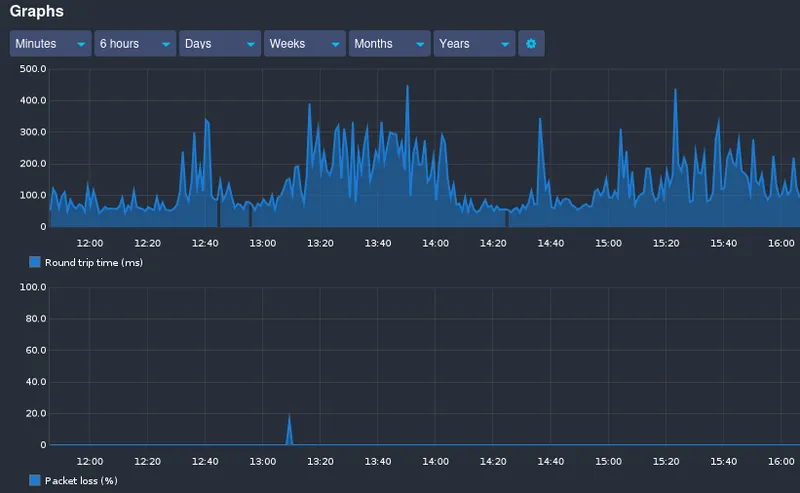
The interesting part: there was no significant packet loss.
That indicates that the connection itself was not really unstable. The packets simply had to wait.
The wrong trail: bandwidth
The first thought is almost always: not enough bandwidth.
So the obvious questions were checked:
- is the internet connection saturated?
- are there large downloads?
- is streaming causing load?
Result: nothing unusual.
The available bandwidth was nowhere near exhausted.
The actual cause: airtime
The decisive point is the medium itself.
Wi-Fi is a shared medium. Only one device can transmit at a time. All others have to wait.
That means the amount of data is not the decisive factor. What matters is the time
a device occupies the channel, the so-called AirtimeAirtime is the available transmission time on a Wi-Fi channel. All devices share this time window, and slower connections occupy it for longer.
More in the IT glossary ->.
Why the Wi-Fi bridge is especially critical
The Wi-Fi bridge plays a central role here.
It has to handle every packet twice:
- receive it
- and transmit it again
So it effectively doubles the required airtime.
With many devices or a weak connection, this has a massive impact.
Slow clients slow everyone down
Another important point: not all devices are equally fast.
A device with a good connection, for example 300 Mbit/s, finishes quickly. A device with a weak connection, for example 6 to 24 Mbit/s, needs much longer.
And that is exactly the problem:
Slow clients block the channel for longer and slow everyone else down.
Many devices mean little airtime per device
With 74 devices, this becomes especially obvious.
Even if each device creates only a small amount of traffic, competition for the medium increases massively.
The result:
- higher latency
- strong jitter
- Wi-Fi that subjectively feels slow
The real lesson
The most important lesson from this case:
- bandwidth is rarely the problem
- airtime is the actual resource
- more devices mean less available transmission time per device
What to take away
For practical operation, the measures are clear:
- place access points sensibly
- avoid Wi-Fi bridges or use them deliberately
- separate 2.4 GHz and 5 GHz cleanly
- reduce clients with poor connections
- connect critical devices by cable wherever possible
If your Wi-Fi is slow despite a strong signal, it’s worth taking a closer look at your DNS infrastructure. In my setup with AdGuard Home, I significantly improved stability and failover.
I come across these kinds of issues quite frequently in real-world environments. With Catarix IT, I help analyze, design, scale, and sustainably stabilize networks.
Conclusion
Wi-Fi problems are rarely solved by simply adding more bandwidth.
If you want to run stable Wi-Fi, you need to understand that airtime is the actual currency.
In this case, the solution was not new hardware, but understanding the medium. And that is often what makes the decisive difference.