

For a long time I ran two Pi-hole instances with cascaded UnboundUnbound is a DNS resolver that resolves queries itself instead of forwarding them to external servers.
More in the IT glossary ->:
pihole1 on a Raspberry Pi 4B and pihole2 as an LXCLXC stands for Linux Containers. Multiple isolated systems run lightweight on a shared Linux kernel.
More in the IT glossary -> container on my Proxmox host.
The goal was to keep a working DNS infrastructure even during maintenance on the Raspberry Pi.
Anyone who has ever stood there without working DNSDNS translates domain names such as kerezovic.de into IP addresses so systems can communicate on the network.
More in the IT glossary -> resolution knows:
DNS is critical core infrastructure.
Synchronizing the configuration was essential because I often work with local DNS entries and did not want to maintain changes twice. At first, I solved this pragmatically with an SSH script.
That ran reliably for months, until pihole1 suddenly developed a permanently high CPU load
caused by pihole-FTL. The cause could not be identified clearly.
The Raspberry Pi stayed at 100 percent utilization across all cores, which was also very noticeable through the fan.
Why AdGuard Home?
I wanted a solution that:
- is resource-friendly and fast,
- can be synchronized reliably,
- and enables real failover without improvised workarounds.
New setup
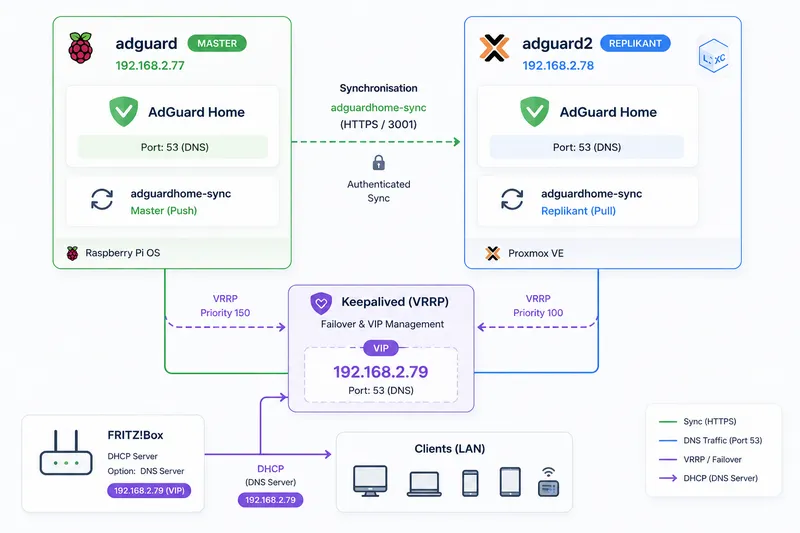
The new setup consists of two independent instances:
- adguard (Raspberry Pi 4B, 192.168.2.77)
- adguard2 (Proxmox LXC, 192.168.2.78)
Both instances run independently, but are kept in sync and each uses
UnboundUnbound is a DNS resolver that resolves queries itself instead of forwarding them to external servers.
More in the IT glossary -> as the upstream resolver.
Synchronization
Synchronization is handled by adguardhome-sync. This keeps filter lists, settings and DNS rules identical automatically.
/etc/adguardhome-sync/config.yaml:
origin:
  url: https://192.168.2.77
  username: adguardadmin
  password: GEHEIM
  insecureSkipVerify: true

replica:
  url: https://192.168.2.78
  username: adguardadmin
  password: GEHEIM
  insecureSkipVerify: true

features:
  generalSettings: true
  filters: true
  services: true
  protectionStatus: true
  dns:
    serverConfig: true
    rewrites: true
    accessLists: true
  dhcp:
    serverConfig: false
    staticLeases: false
Manual configuration maintenance is no longer necessary.
Failover with virtual IP
For failover, I use keepalived with a Virtual IPA virtual IP can move between multiple systems and is used for failover and high availability.
More in the IT glossary ->.
This address is used as the central DNS server in the network.
This brings two important advantages:
- automatic FailoverFailover means that a second system automatically takes over when the first one fails, improving availability.
More in the IT glossary -> when one instance fails - compatibility with the Fritzbox, which can only distribute one DNS server via DHCPDHCP automatically assigns IP addresses and other network settings to devices on a network.
More in the IT glossary ->
All clients therefore use only the virtual address: 192.168.2.79.
Health check for keepalived
So that failover is not based only on the network interface, I use a dedicated health check.
It actively checks whether the local DNS service still answers correctly:
#!/bin/bash
dig @127.0.0.1 -p 53 kerezovic.de \
  +short +time=2 +tries=1 >/dev/null 2>&1 || exit 1
exit 0
If the query fails, the script returns an error code. The instance is marked unhealthy and releases the virtual IP.
This detects not only system failures, but also functional problems in the DNS service itself.
keepalived configuration
vrrp_script chk_adguard {
    script "/usr/local/bin/check_adguard.sh"
    interval 2
    weight -60
}

vrrp_instance VI_1 {
    state MASTER
    interface eth0
    virtual_router_id 51
    priority 150

    advert_int 1

    authentication {
        auth_type PASS
        auth_pass GEHEIM
    }

    virtual_ipaddress {
       192.168.2.79
    }

    track_script {
        chk_adguard
    }
}
The health check runs every two seconds. If there is a failure, the priority drops so the second instance takes over automatically.
In practice, this results in failover within a few seconds.
Advantages of the new setup
- no duplicate configuration maintenance
- clean and transparent redundancy
- identical configuration on both systems
- functional health check instead of pure network monitoring
A stable network doesn’t end with Wi-Fi coverage – DNS plays a crucial role as well.
Stable and secure infrastructure is no coincidence. With Catarix IT, I help implement setups like this in a clean and reliable way.
Conclusion
The switch to AdGuard Home was clearly worth it for me. The setup is more stable, easier to maintain and much more robust against failures.