
A real-life example
A few months ago, something happened in my family that shows very clearly why phishing can be so dangerous. A family member had recently completed a legitimate contract change with a hosting provider. During that process, several real emails from that provider arrived.
A few days later, a fake message arrived that appeared to match the situation perfectly. Because of that, it seemed believable. The family member tried several times to send money by credit card. Fortunately, the bank blocked those transactions automatically. No money was lost.
The important point is this: the bank was not malfunctioning. Its fraud detection systems recognized suspicious behavior. To be safe, the family member later contacted the bank again and asked whether further action was necessary. The bank said that no account lock was required, but still sent a replacement credit card as a precaution.
This example shows something important: people usually do not fall for phishing because they are careless or unintelligent. Often it happens because a fake message arrives at exactly the right moment and fits perfectly into a real situation.
Phishing is not a niche problem
Cybercrime no longer affects only companies, governments or particularly careless people. According to the 2026 Cyber Security Monitor published by the German Federal Office for Information Security (BSI), one out of nine internet users in Germany was affected by cybercrime in 2025.
This makes one thing clear: phishing is an everyday problem. It affects parents, grandparents, children, friends, employees, freelancers and businesses alike.
Anyone who feels unsure in private or professional situations should rather ask one question too many than one too few. Everyday IT security, understandable technology and practical help are also part of the topics I work on at Catarix IT.
What is phishing?
Phishing means that criminals try to deceive people using fake messages. Their goal is usually to steal money, passwords, credit card information or other sensitive data.
The term comes from the word “fishing”. Criminals throw out digital bait and hope that someone takes it. Victims may end up on fake websites, enter passwords, open dangerous attachments or send payments.
Years ago, phishing messages were often easy to recognize because they contained obvious spelling mistakes or strange wording. Today, many phishing messages look professional. Logos, colors, layout and language often appear authentic.
Another important factor is artificial intelligence. Criminals increasingly use AI systems to create more believable phishing messages. Texts contain fewer mistakes, sound more natural and can quickly be translated into many languages. Some messages can even imitate the writing style of real companies.
In the past, scammers needed to be convincing writers themselves. Today, AI can help create realistic phishing messages at massive scale.
Phishing does not happen only by email
Many people still think primarily about email when they hear the word phishing. But modern phishing attacks appear through many different channels:
- Text messages (SMS)
- WhatsApp, Signal, Telegram and other messengers
- Facebook, Instagram and other social networks
- Online marketplaces and classified ads
- Fake support chats
- QR codes on letters, posters or websites (“quishing”)
- Phone calls leading victims to malicious websites
Even secure messengers cannot protect users from manipulation. Encryption protects the transmission of a message, but it cannot stop someone from writing a convincing fake message.
Phishing is not always about money
Many phishing attacks target money directly: credit cards, online banking, PayPal accounts or cryptocurrency wallets. But money is only one possible goal.
Account credentials are often even more valuable. Access to an email account may allow attackers to reset passwords for other services. Access to company accounts may expose customer data, internal documents or invoices. Access to social media accounts can be used to deceive even more people.
In politics, government agencies and businesses, phishing may also be used for espionage, data theft or privilege escalation. The first compromised account is often only the beginning.
Why phishing works so well
Phishing attacks do not target computers first. They target human psychology.
Criminals exploit emotions and everyday situations. Common tactics include:
- Urgency: “Your account will be locked immediately.”
- Fear: “Suspicious activity has been detected.”
- Curiosity: “Here are the photos from yesterday.”
- Trust: The message appears to come from a well-known company.
- Habit: People click quickly because they receive similar messages regularly.
- Perfect timing: The message matches a real ongoing situation.
That final point was crucial in the real-life example above. Genuine emails had arrived shortly before. That made the fake message appear plausible.
How can you recognize phishing?
There is no single warning sign that always guarantees a message is fake. But there are many indicators that should make you cautious.
The message creates pressure
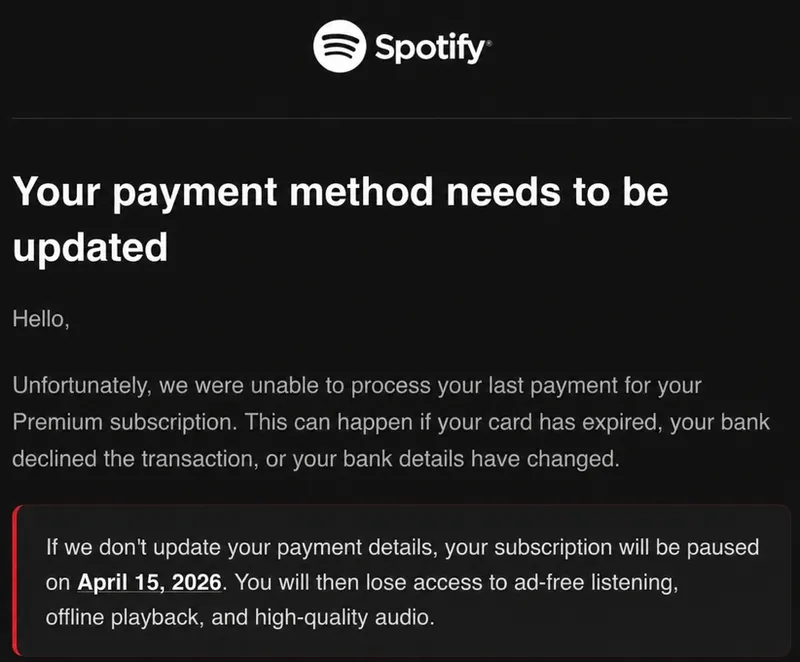
Be careful when a message demands immediate action. Common examples are account lock warnings, failed payment notifications or urgent verification requests.
You are asked to click a link
Be especially careful with links asking you to log in, confirm data or make payments. It is safer to type the provider’s address manually into your browser.
The web address looks unusual
Attackers often use addresses that look similar to legitimate ones. A small change, an additional word or a strange domain ending can be enough.
This is especially difficult to recognize on smartphones because long web addresses are often shortened or partially hidden.
Examples of suspicious web addresses
account-security-paypal.cominstead ofpaypal.comamazon-order-check.netinstead ofamazon.commicrosoft-login-verify.bizinstead ofmicrosoft.comapple-id-confirmation.orginstead ofapple.combank-verification-alert.netinstead of your real bank website
The message does not fully match the situation
Maybe the company name is correct, but the process itself is not. Perhaps you did not order anything. Maybe you are asked to confirm a payment you never expected. Small inconsistencies like these are often important warning signs.
Sensitive data is requested
Legitimate companies normally do not ask for passwords, PINs, TANs or complete credit card details through email, text messages or messenger apps. If a message requests exactly this kind of information, you should become very cautious.
Attachments appear unexpected
Attachments such as invoices, warnings, delivery information or applications can be dangerous when they arrive unexpectedly. Do not open such files carelessly, especially if the message tries to create pressure.
The wording or greeting feels strange
Years ago, spelling mistakes were often a clear warning sign. Today, many phishing texts are written surprisingly well. Still, unusual greetings, strange wording or an unnatural tone can indicate a fake message.
The sender address only looks legitimate at first glance
Email display names can easily be faked. The important part is the actual email address behind the name.
Examples of suspicious senders
PayPal Security <service@account-security-paypal.com>Amazon Support <orders@amazon-order-check.net>Microsoft 365 <support@microsoft-login-verify.biz>Apple ID <help@apple-id-confirmation.org>Bank Support <service@bank-verification-alert.net>
How should you react to suspicious messages?
- Do not click suspicious links.
- Do not open unexpected attachments.
- Do not enter passwords or payment data.
- Open the provider’s website manually.
- Check your customer account directly.
- Ask the provider if you are unsure.
- Delete or report suspicious messages.
A simple rule is: when a message creates pressure, slow down instead of reacting quickly.
First aid: What should you do if you already fell for it?
Falling for phishing is stressful and embarrassing for many people. But quick action is more important than shame.
If you entered payment data
- Contact your bank or payment provider immediately.
- Ask whether your card or account should be blocked.
- Monitor your transactions carefully.
- Document the incident if possible.
If you entered a password
- Change the password immediately.
- Change it everywhere else if you reused it.
- Enable two-factor authentication.
- Log out suspicious sessions and devices.
If you opened a suspicious attachment
- Disconnect the device from the network if necessary.
- Run a security scan.
- Change important passwords from another trusted device.
If money has already been transferred
- Contact your bank immediately.
- Ask whether chargeback or recovery options are available.
- Report the incident to the police.
- Save screenshots, payment information and suspicious messages as evidence.
Fast reactions can significantly reduce damage.
Who is liable for the damage?
There is no universal answer. Liability depends on the specific situation, the payment method and whether negligence is involved.
Banks and payment providers often investigate such cases carefully. Credit card payments may allow chargeback procedures, while bank transfers are usually harder to reverse.
This article is not legal advice. In serious cases, contact your bank, payment provider or a legal professional.
Why is it so difficult to stop phishing criminals?
Phishing attacks are often international, automated and built on stolen or rented infrastructure.
Criminals use fake websites, hacked servers, botnets, stolen accounts and temporary domains. Many malicious websites disappear quickly and reappear somewhere else.
Large-scale phishing campaigns only need a small number of victims to become profitable.
How can you protect yourself better?
- Do not react under pressure.
- Type important web addresses manually.
- Use different passwords for different services.
- Enable two-factor authentication whenever possible.
- Keep devices and software updated.
- Talk openly with friends and family about scams.
- Ask for help if something feels suspicious.
Many victims feel ashamed after falling for phishing. Unfortunately, that often helps criminals because incidents remain hidden for too long.
Talking openly about phishing helps other people recognize scams more quickly.
Additional protection mechanisms such as ad and DNS filters can also help. Solutions like AdGuard Home or Pi-hole may block known phishing and malicious websites before they are even opened.
Conclusion: Stay cautious, not paranoid
Modern phishing attacks are dangerous because they often look completely normal. They are professional, well written and sometimes arrive at exactly the right moment.
But people are not helpless. Staying calm, checking links carefully and reacting quickly in case of a mistake can prevent or reduce serious damage.
And perhaps this is the most important message of all: falling for phishing is not a sign of stupidity. Criminals continuously improve their methods. That is exactly why awareness and open conversations matter so much.